The 1:1, group, and community automation platform — all in one place.
Centralize 1:1 conversations, groups, and campaigns without losing context or control
Info product creators, marketing agencies, digital businesses, and brands that scaled without improvising.
José Luis Gálviz
CEO RedLab | USA
20+ años en Marketing Digital
Vengo de más de 20 años en marketing digital. He usado muchas herramientas... pero Funnelchat me sorprendió. En cuestión de una hora ya estaba creando mis primeros flujos y viendo resultados reales en mi negocio.
Javier Jaimes
Asesor de las Marcas Personales
Funnelchat ya tiene lo que se está viendo en USA... La IA que probé es mejor que un setter. IA atiende 1 o 1 millón con el mismo entusiasmo y hace el 90% del trabajo operativo dejando al equipo libre para lo estratégico.
Jesui David Hernandez
Operador de plataformas
H&C capacitación integral
Mandamos todo nuestro tráfico de Facebook Ads a WhatsApp. Con Funnelchat automatizamos el proceso y reducimos drásticamente el tiempo de atención. Ahora nuestro equipo trabaja más rápido y con mejor control.
Antonio Lizarán
Fundador de Chocopuntos
No tengo ninguna duda: es una plataforma fácil de usar. En minutos configuré automatizaciones que antes me tomaban horas. Eso se traduce en más rapidez, más orden y mejor experiencia para mis clientes.
Nabil Hamideh
Publicista | Afiliado
Funnelchat me ordenó el negocio. Llegó justo cuando ya estaba saturado con mensajes y leads. Me organizó el panel, el CRM y el proceso, y me devolvió el control. Vas a probar más software, vas a pasar la curva de aprendizaje... y al final vas a regresar a lo que funciona: estructura, seguimiento y soporte rápido.
Berenice - Mark System
Auxiliar Comercial
"Con Funnelchat logramos dar seguimiento real a nuestros clientes. Las automatizaciones y los envíos masivos nos ayudan a no dejar escapar oportunidades. Ahí entendimos el poder de usar WhatsApp con estrategia. Si surge algún inconveniente, escribimos al grupo de soporte y nos responden rápido. Eso da tranquilidad cuando estás operando campañas."
Carlos Ernesto Morales
CEO de Piolas y Piolas
"Me ha ido súper bien con Funnelchat. Las automatizaciones listas para usar hacen todo más simple, así es como se escala WhatsApp de verdad. Después de usar Funnelchat, entendí que ya era momento de migrar a la API. Cuando tu negocio crece, necesitas algo más profesional. Y el equipo me está acompañando en todo el proceso. Siempre dispuestos a ayudar, sesiones grupales cada semana y un Account Manager dedicado. No es solo una herramienta, es acompañamiento real."
Empieza hoy y automatiza tu WhatsApp en minutos
This is WhatsApp without structure vs. with Funnelchat.
More than 53 countries around the world trust Funnelchat to automate and scale their WhatsApp communication.
Handle FAQs and requests even when the team is offline.
Schedule drops, send reminders, and keep launches warm.
Score contacts, detect intent, and trigger tasks automatically.
Route every chat to the right agent with full context.
Use ready-made templates or train your bot in minutes—no code.
Connect CRMs, payment links, and automation stacks seamlessly.
Train the AI Agent with your documents, FAQs, and playbooks.
Train with your own knowledge
Upload PDFs, FAQs, and SOPs so it responds in your exact tone.
Answers 24/7 in any language
Understands intent, keeps context, and hands off to humans when needed.
Logs every conversation
Updates your CRM, notes, and follow-ups automatically so nothing slips.
Coordinate 1:1 chats, groups, and communities flawlessly.
GROUP COMMUNICATION
Manage announcements, reminders, and engagement automatically.
CENTRAL OPERATIONS
Start the day with qualified leads and executed follow-ups.
AUTOMATED FLOWS
Build end-to-end flows, connect payments, and trigger AI sequences.
Webhooks & official APIs
Direct collaboration with Meta ensures stability, compliance, and official WhatsApp API access.
Lower risk of bans
Automations aligned with policies
Direct WhatsApp API access
Scale without hacks
Active businesses in LATAM
Messages processed
Groups and communities managed
Active countries
Funnelchat is technology plus human expertise.
We help you structure WhatsApp around your process, stage, and team so execution stays under control.
Ideal for businesses whose teams prioritize customer service on WhatsApp.
Ideal for businesses whose teams need extra integrations, advanced features, and premium support.
Ideal for businesses whose teams prioritize customer service on WhatsApp.
Tap each one to see what it's about.
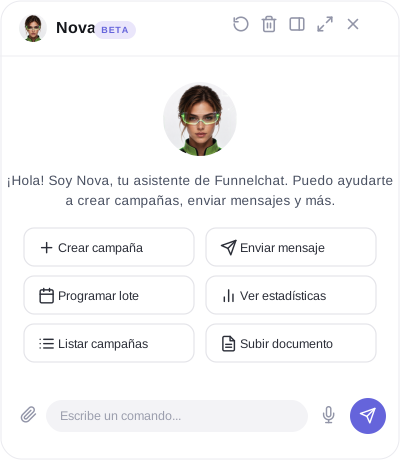
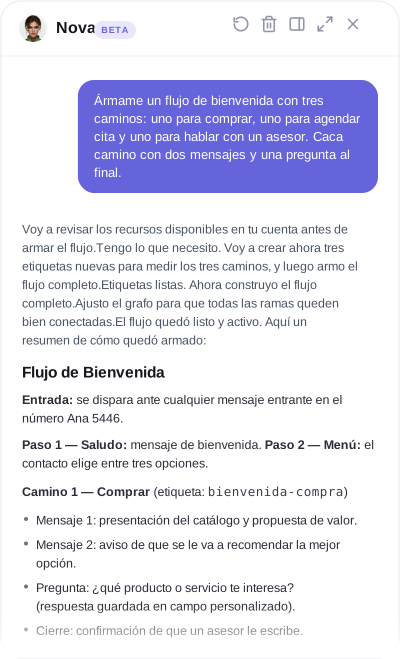
Ask it in plain language to check your numbers, create campaigns, build flows, or schedule messages in your Funnelchat account, and it does it for you, without you touching a single menu.
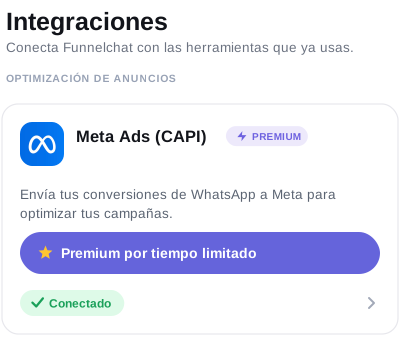
Without CAPI, Meta only knows who messaged you. With CAPI, Meta also knows who ended up buying, so your campaigns stop bringing you leads who just chat and start bringing leads who convert, because Meta learns to look for the profile of people who actually buy.

We're working on bringing more channels, like Instagram and Messenger, into the same platform, so you can manage them alongside your WhatsApp from one place. Coming soon.
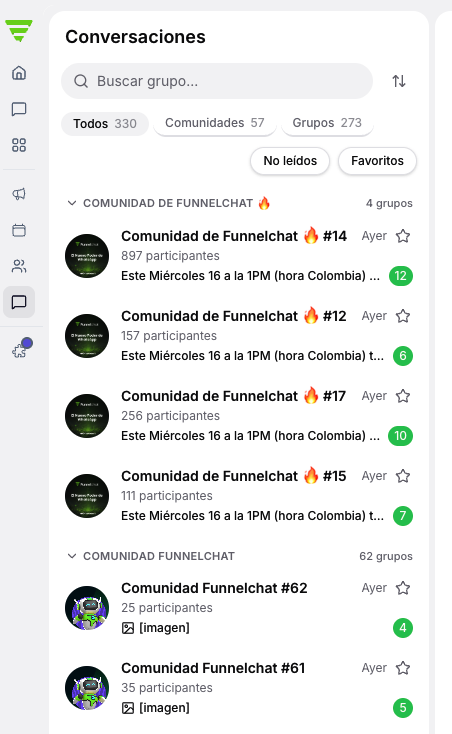
A dedicated section to manage, review, and reply to the chats from your groups and communities in one place, with scheduled messages and campaigns with a unique link. It complements and boosts the group and community management already included in your plan. Coming soon
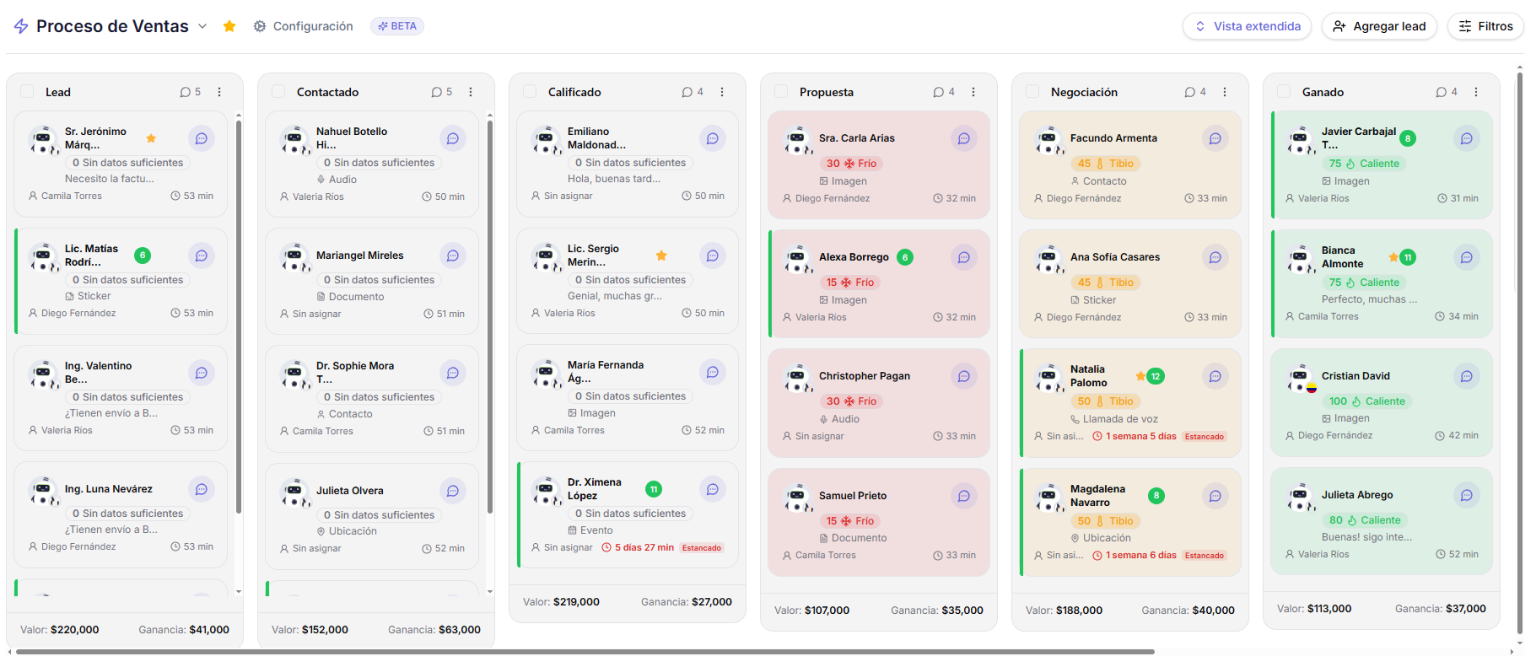
Organize your contacts into visual pipelines with up to 10 boards and drag between stages with drag & drop. Each column inherits the color and logic of your tags, synced in real time with your flows and campaigns.
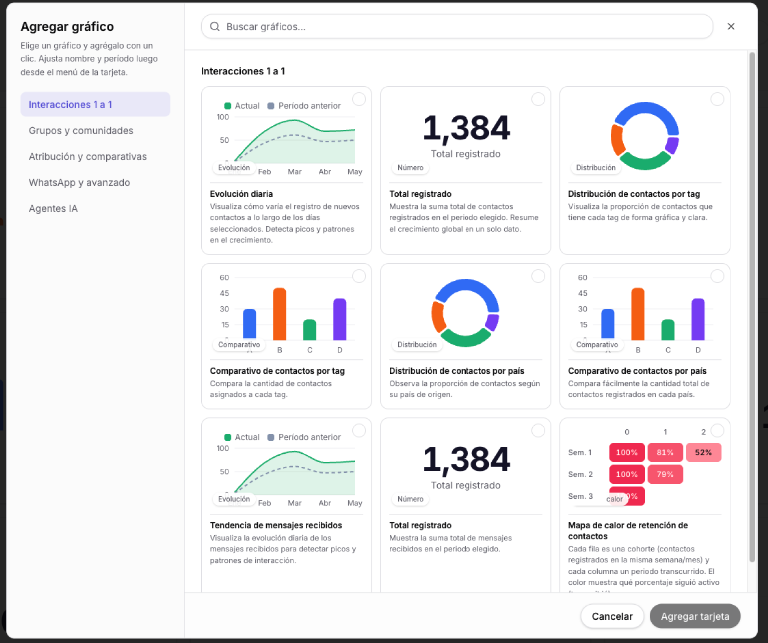
10 customizable dashboards with 5 chart types (bar, line, area, pie, and counter). Drag, resize, and filter by tags, campaigns, or time periods, with contact and/or group data in real time.
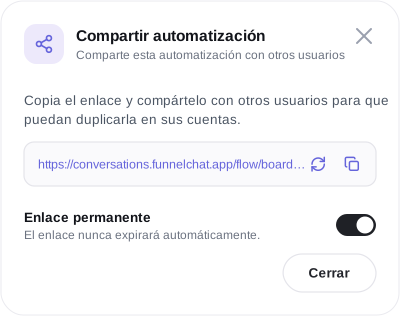
Share your flows and automations with other Funnelchat accounts through a link, so your team or your clients can reuse what you already built without starting from scratch.
Connect your Funnelchat account to Claude to ask it, in plain language, to create content, modify what you already have, or review your data directly in the platform; without you having to go in and do it.
Soon you'll be able to connect your own API key with the AI of your choice. Coming soon
Use your own domain (for example, chat.yourbusiness.com), so your customers recognize your brand in every link you share.
Features organized by each part of Funnelchat
| Feature | Growth | Advanced | Infinity |
|---|---|---|---|
| Manage conversations from all your numbers in one place All your conversations, no matter the number, in a single inbox. | |||
| Unlimited quick replies Save your most-used replies and insert them with a shortcut, with no limit. | |||
| Advanced filters Segment with combined filters: tags, activity, custom fields. | |||
| Custom lists Create your own lists to organize your conversations however you need. | |||
| Send templates and automations Send templates and trigger automations straight from the chat. | |||
| View actions taken by the contact See what the contact did: which links they clicked, which automation fired, etc. | |||
| Shared inbox All connected numbers share the same chat inbox — the main admin sees everything in one place. | |||
| Automatic assignment to users Distributes incoming conversations across your team based on rules you define. | |||
| Configurable visibility per user Decide which conversations each person on your team can see. | |||
| Custom chat permissions for your team Define what each person on your team can do inside the chat. | |||
| Pipeline-style board per user Each user manages their own pipeline-style follow-up board. | |||
| Manage all your contacts Organize and manage all your contacts in one place. | |||
| Tags and custom fields Organize your contacts and use them to segment automations and campaigns. | |||
| Integrated Kanban CRM by tags and stages Visual pipelines with up to 10 boards and drag & drop, synced in real time. | — | ||
| Sales-cycle tracking pipeline Follow every contact through your entire sales cycle. | |||
| AI answer validation in automations AI checks whether the contact's answer makes sense before moving to the next step. | — | ||
| Drag and drop to build conversation flows Build your automations step by step by dragging and dropping. | |||
| Automated handling of incoming contacts Automate what happens with every contact who messages you for the first time. | |||
| Inbound webhook integration Receive events from other systems and trigger them inside your automations. | |||
| Outbound HTTP request integration Connect your automations to any external system to fetch or send data. | |||
| Inactivity follow-ups Automatically pick the conversation back up if the contact stops replying. | |||
| Organize automations into folders Sort your flows into folders to find them faster. | |||
| Buttons Add interactive buttons inside your automations. | |||
| Simple questions and sending images, text, audio, and video Build capture steps and multimedia content inside your flows. | |||
| Automatically open conversations with templates Start a new conversation automatically using a template. | |||
| Multiple triggers Fire the same automation from different triggers. | |||
| AI copywriting AI helps you write the messages in your automations. | |||
| Business-hours management for replies Define the hours each automation replies in. | |||
| Smart distribution of messages and users (rotator) Distributes messages or conversations across your team on rotation. | |||
| Wait times between actions Schedule pauses between one step of your automation and the next. | |||
| Share your flows Share flows and automations with other accounts through a link. | — | ||
| Custom domains Use your own domain so your customers recognize your brand in every link. | — | ||
| WhatsApp short links wa.link links with a pre-filled message. | |||
| Click and device-type metrics Measure how many clicks each link gets and from which device type. | |||
| Activate the link with a QR code Turn your Whalink into a QR code ready to print or share. | |||
| Save custom fields and tags from forms or websites Capture information straight from your forms or web pages. | |||
| Pixel tracking Connect the Facebook pixel to your links to measure which campaigns drive sales. | — | ||
| Multiple links per connected device Create several different Whalinks for the same connected number. | |||
| Alternate redirect to a web page Send the contact to a web page instead of WhatsApp, if you need to. | |||
| Link description and image preview Customize how your link looks when shared: description and image. | |||
| Unlimited custom template creation Create every message template you need, with no limit. | |||
| Organize messages into folders Sort your messages and campaigns into folders. | |||
| Unlimited bulk message sends No limit on campaigns or contacts. | |||
| Audience segmentation per send Pick exactly who receives each send based on your filters and tags. | |||
| Per-send metrics (reads, failures, interactions) Measure read rate, failed messages, and interactions for every send. | |||
| Schedule messages by date and time Schedule your bulk sends for the exact moment you want. | |||
| Integration with automations Connect your bulk sends to your existing automations. | |||
| Customizable dashboards 10 dashboards with 5 chart types, filterable by tags, campaigns, or time periods. | — | ||
| Feature | Growth | Advanced | Infinity |
|---|---|---|---|
| Unlimited groups and communities Manage all your groups and communities with no limit, with campaigns and scheduled messages. | |||
| Active campaigns How many distribution campaigns you can have running at once: unlimited. | |||
| Smart distribution link One link that spreads visitors across your groups automatically. | |||
| Destination types (Group + Community + Channel) The link can distribute to groups, communities, or channels. | |||
| Join and leave tags Automatically tags anyone who joins or leaves a group, with no limit. | |||
| Parallel / sequential distribution Choose whether groups fill all at once or one after another. | |||
| Backup groups Creates new groups automatically when the current ones fill up. | |||
| Redirect conditions (country, IP, URL) Send each visitor to a different group based on their country, IP, or source URL. | |||
| Tracking / conversion pixel Measure which group campaigns actually drive conversions. | |||
| Custom link (your own domain) Use your own domain in your group distribution links. | |||
| Anti-bot protection (captcha) Keeps bots and fake sign-ups from entering your groups through the link. | |||
| Webhooks per event Get an automatic notification every time something happens in your group campaigns. | |||
| AI validation of names and descriptions AI checks that the group name and description comply with WhatsApp policy before publishing it. | |||
| AI name variations (anti-spam) AI generates variations of the group name to avoid spam bans. | |||
| Number quality alert Warns you when activity on a number is running too high, before WhatsApp penalizes it. | |||
| Time-spaced sending Spaces your sends out over time to prevent bans. | |||
| Load balancing across numbers Spreads sends across several numbers to avoid overloading just one. | |||
| Copy improvement in scheduled messages AI helps you write better messages for the ones you schedule to your groups. | |||
| AI moderation in communities AI moderates your community content based on the criteria you set. | |||
| AI message variations AI generates automatic variations of your messages so they don't look repetitive. | |||
| Simultaneous sending to multiple groups Send the same message to several groups at once. | |||
| Content types Send text, images, video, audio, documents, or links. | |||
| Polls and events in messages Include polls or events directly in the messages you send to your groups. | |||
| Mention everyone (@all) Mentions every participant in the group in one message. | |||
| Click tracking per link sent Measure how many clicks each link you sent inside a message received. | |||
| Click metrics per button sent Measure how many clicks each button you included in a message received. | |||
| Send now or schedule by date/time Send a message right now or schedule it for a specific date and time. | |||
| Pin message (24h / 7d / 30d) Pin an important message in the group for 24 hours, 7 days, or 30 days. | |||
| Recurring sends and welcome messages Schedule messages that repeat on their own and automatic welcomes for new members. | |||
| Calendar view and planning mode View and plan all your scheduled messages on a calendar. | |||
| Clicks, joins, and leaves per campaign Measure how many clicks, joins, and leaves each distribution campaign had. | |||
| Message read rate What percentage of your group read each message you sent. | |||
| Geographic analysis (top countries) Which countries the people joining your groups come from. | |||
| Click history (IP, country, device) The details of every click received: IP, country, and device. | |||
| Comparison across groups in the same campaign Compare how the different groups within one campaign perform. | |||
| Import existing groups from WhatsApp Bring the groups you already created on WhatsApp into Funnelchat. | |||
| Participant and admin sync Keeps the participant and admin list of your groups up to date. | |||
| Export participants (active or historical) Download the current participant list or the full history. | |||
| Bulk actions (admins, photo, description) Change admins, photo, or description across several groups at once. | |||
| AI Features for Groups and Communities AI content creation, suggestions, and message management for your groups. | |||
| Group chat Manage, review, and reply to group chats from one place, with campaigns and unique links. | — | ||
| Feature | Growth | Advanced | Infinity |
|---|---|---|---|
| Unlimited AI agents No limit on the number of AI agents. | |||
| Number of AI-generated messages Replies the AI can deliver per month. | 2,500/month | 6,000/month | 16,000/month |
| Agent configuration by objective Available objectives are: FAQs, sales, appointments, lead capture, quotes, and support. | FAQs | All objectives | All objectives |
| General agent settings Customize your AI agent's behavior and rules. | |||
| Sandbox to test the agent Test your agent before publishing it, without it talking to real contacts. | |||
| Total knowledge capacity How much your AI agent can learn. | 10 MB | Unlimited * | Unlimited * |
| Free text Train your agent with free-form text. | |||
| FAQs Train your agent with already-answered frequently asked questions. | |||
| Web sources (scraping) Train your agent with content from your business's web pages. | |||
| Upload documents (PDF, Word) The agent learns straight from your manuals, catalogs, or guides. | |||
| Google Drive connection Connect a Drive folder and use its content as it is at that moment to train your agent. | — | ||
| YouTube videos as a source Add a YouTube video as a knowledge source for the agent. | — | ||
| Media resources Train your agent with images, audio, or other media resources. | — | ||
| Product catalog Connect your product catalog as a knowledge source for the agent. | — | ||
| Data capture Set which information to request from your contacts and in what order, so the AI captures data and saves it to custom fields. | — | up to 10 | up to 10 |
| Automatic follow-up messages The agent follows up automatically if the contact doesn't reply. | |||
| Automatic close on inactivity The agent closes the conversation on its own if the contact goes inactive. | |||
| Transfer rules How many rules you can set to hand the conversation to a human, another AI agent, or an automated flow. | |||
| Smart follow-up (auto tasks) The agent creates follow-up tasks automatically based on the conversation. | — | ||
| Automatic AI tagging The agent tags contacts automatically based on the conversation. | — | 10 | 10 |
| Calendar integration The agent books appointments by checking your real availability. | — | ||
| NOVA — your AI assistant Ask it in plain language to check your numbers, create campaigns, or schedule messages. | — | ||
| Image interpretation The agent understands and interprets the images your contacts send. | |||
| WhatsApp audio transcription Every voice note is automatically transcribed to text. | |||
| AI voice replies The agent replies with naturally generated voice notes. | — | ||
| Basic agent metrics 6 cards with key metrics and their trend. | — | ||
| Agent conversations (viewer + knowledge gaps) Review the agent's conversations and spot gaps in its knowledge. | — | ||
| Custom date ranges Filter the agent's metrics by whatever date range you need. | — | ||
| Feature | Growth | Advanced | Infinity |
|---|---|---|---|
| Social media (coming soon) Manage Instagram and Messenger alongside your WhatsApp from one place. | — | ||
| CAPI — Meta ads that attract buyers Meta learns which leads actually buy, not just who messages you. | — | ||

| Connect Funnelchat to Claude (MCP) Ask Claude to create or review content directly in your account. | — | ||

| Use your own API key (coming soon) Connect the AI you prefer instead of paying for message packs. | — | — | — |
| Feature | Growth | Advanced | Infinity |
|---|---|---|---|
| Initial session included (worth | |||
| Support via WhatsApp and in-app chat Monday to Sunday, holidays included. | |||
| Live sessions, every day Daily Zoom sessions to answer specific questions about the platform. | |||
| API connection sessions every Thursday Weekly live session for questions about integrations and API connections. | |||
| Funnelchat Academy Training to learn everything about Funnelchat, WhatsApp, and usage best practices. | |||
| Recorded tutorials Learn at your own pace with access to recorded tutorials. | |||
| Weekly webinars Weekly live training on WhatsApp and Funnelchat. | |||
| Support group A WhatsApp channel exclusively for your team, separate from the general queue. | — | ||
| Key Account Manager A dedicated Funnelchat person assigned to your account. | — | ||
Not sure which plan is right for you?
Book a personalized meeting with our team and we'll advise you, no strings attached.
You can connect WhatsApp, WhatsApp Business, and the WhatsApp API. Each one serves different goals, and in your initial session we help you pick the right one for your business needs.
No. Anyone on your team can use it. We include an initial session to get you fully set up, support every day, and Nova, your AI assistant, who creates campaigns, builds flows, and schedules messages for you — just ask.
Yes. You can migrate your WhatsApp contacts, groups, and communities to Funnelchat so you don't start from scratch and can keep working with your base from day one.
Yes. Every plan includes several users, and you manage the conversations from all your numbers in a single inbox, with chat assignment so your team stays organized.
Yes, from the Advanced plan onward. You can add extra WhatsApp numbers, agents, and AI-generated messages so your account grows with your business.
Yes. You can switch plans whenever you like, with no lock-in. And if you want to cancel, just ask support and they'll walk you through the steps.
Get started in minutes
Spin it up fast. No commitments. Cancel anytime.
Sign up free with your email. Takes 30 seconds.
Link your Business or API number in one click.
Activate flows, auto-replies and start scaling.
Everything you need to operate with Funnelchat.
Use your current line or request Meta-verified numbers.